
Claude Relay Service
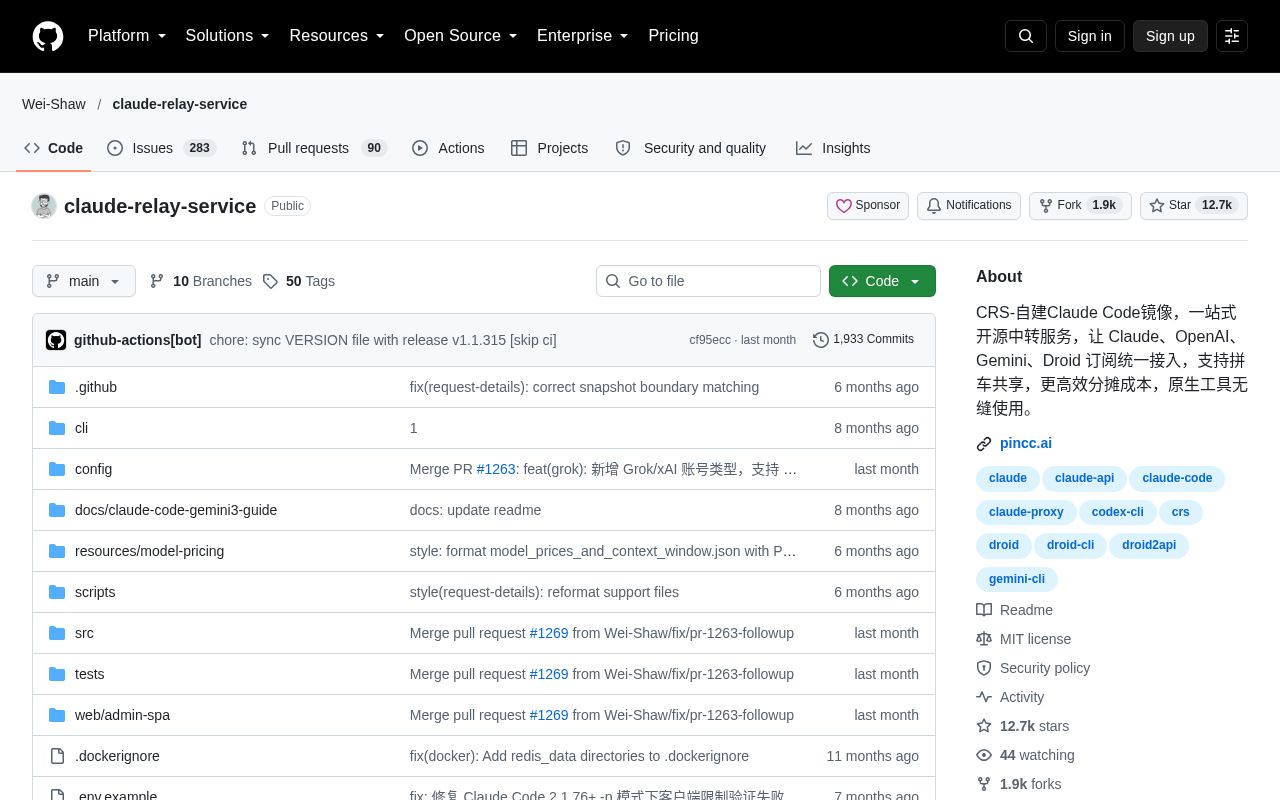
Claude Relay Service (CRS) is a self-hosted, open-source AI API relay service. It brings Claude, OpenAI (Codex), Gemini, Droid and other accounts together in one place, supports rotation across multiple accounts, assigns each user an independent API Key, and provides usage statistics and a web admin dashboard.
Alternatives
Tech stack
No tech stack added yet. Sign in to suggest some
Claude Relay Service (CRS for short) is an AI API relay service you can deploy yourself. The official description calls it a "self-hosted Claude Code mirror, an all-in-one open-source relay service." It brings subscription accounts for Claude, OpenAI, Gemini, Droid and others together in one place, and lets several people share them (carpooling) to split the cost. All requests pass only through your own server, which then connects directly to the upstream API.
Security notice: The official README warns that v1.1.248 and earlier contain a critical admin authentication bypass vulnerability that lets attackers access the admin panel without authorization. Please upgrade to v1.1.249 or later, or migrate to CRS 2.0 (sub2api), the new-generation project the maintainers recommend.
Compliance risk: The maintainers state clearly that using this project may violate Anthropic's Terms of Service, and users bear the risk themselves. The project is intended only for technical learning and research, and the author is not responsible for losses such as account bans or service interruptions.
Key Features
- Multi-account management: Add multiple Claude accounts via OAuth authorization, with automatic rotation; if an account has problems, the system switches to the next one automatically.
- Custom API Keys: Assign each user an independent Key (starting with
cr_), with configurable rate limits, concurrency limits, model restrictions and client restrictions. - Multi-platform account pool: Account types are distinguished by route prefix, including
/claude/,/antigravity/api/,/gemini/,/openai/,/droid/claude/and/droid/openai/, and the same Key works across all of them. - Usage statistics and monitoring: The web admin interface (
/web) shows each Key's token usage and converts it to cost at official prices; there is also a/healthhealth-check endpoint. - Temporary suspension and cooldown: When the upstream returns 503, 5xx, overload, authentication or timeout errors, the system temporarily suspends routing to that account. Cooldown time can be configured globally or per account.
- Security controls: Supports access restrictions, rate control, and client identification via User-Agent (such as ClaudeCode and Gemini-CLI).
- Proxy support: Supports HTTP/SOCKS5 proxies, and you can set a static proxy IP for each account.
- Performance optimization: Uses connection pooling and caching to reduce latency.
Target Users and Use Cases
- Small groups who want to carpool with friends to split the cost of subscriptions such as Claude Code Max.
- Developers who care about data privacy and don't want third-party mirror sites to see their conversations.
- Users with some technical background who are willing to set up and maintain the service themselves.
- Users who need long-term, stable access and don't want to depend on third-party mirror sites.
- Users in regions where Claude services can't be accessed directly.
Client Setup
The official README gives configuration examples for the following clients:
- Claude Code: Set the
ANTHROPIC_BASE_URLandANTHROPIC_AUTH_TOKENenvironment variables. - Gemini CLI: Can connect through either the Gemini Assist API or the Gemini API.
- Codex: Configure in
~/.codex/config.tomlandauth.json; only the OpenAI Responses format is supported. - Droid CLI: Add a custom model in
~/.factory/config.json. - Cherry Studio and other third-party tools: Select the matching provider type, then enter the service address and API Key.
- VSCode Claude extension: Requires configuring
primaryApiKeyin~/.claude/config.json.
Deployment
Hardware requirements (minimum): 1 CPU core, 512MB RAM (1GB recommended), 30GB of free disk space. The maintainers suggest 2 cores and 4GB is enough, and recommend a server that can reach the Anthropic API, such as one located in the US. They also note that overseas hosts from Alibaba Cloud and Tencent Cloud were found in testing to be blocked by Cloudflare.
Software requirements: Node.js 18+, Redis 6+; Linux is recommended.
- One-click script deployment (officially recommended): Download and run
manage.sh install, which installs dependencies, walks you through configuration and starts the service. Afterward you can manage the service with thecrscommand (install/start/stop/restart/status/update/uninstall). Supports Ubuntu/Debian, CentOS/RedHat, Arch Linux and macOS. - Manual deployment: Clone the repository, run
npm install, copyconfig/config.example.jsand.env.exampleand setJWT_SECRETandENCRYPTION_KEY, build the frontend, initialize withnpm run setup, then run in the background withnpm run service:start:daemon. - Docker Compose: Generate
docker-compose.ymlwith the official script, then rundocker-compose up -d. The configuration includes Redis, data persistence, health checks and automatic restart.
The admin account can be generated automatically (saved in data/init.json) or preset through the ADMIN_USERNAME and ADMIN_PASSWORD environment variables. In production, using Caddy or Nginx Proxy Manager as a reverse proxy is recommended. If you use an Nginx reverse proxy with Codex CLI, you need to add underscores_in_headers on; to the http block.
Worth Noting
- Released under the MIT license; the tech stack is Node.js plus Redis, with an admin dashboard built as an SPA.
- The project offers a demo site and an announcement channel, and has an English README.
- Be sure to read Anthropic's Terms of Service before use, and update promptly to versions that include security fixes.
Discover more

1time
Zero-knowledge one-time secret sharing. End-to-end encrypted, self-hosted, open source.

4ga Boards
Straightforward realtime kanban boards management for intuitive task tracking. Featuring an elegant dark mode, collapsible todo lists, and multitasking tools to supercharge your team's productivity.

AFFiNE Community Edition
There can be more than Notion and Miro. AFFiNE(pronounced [ə‘fain]) is a next-gen knowledge base that brings planning, sorting and creating all together. Privacy first, open-source, customizable and ready to use.

ANALOG
A minimal analytics tool to self-host.

Activepieces
No-code business automation tool like Zapier or Tray. For example, you can send a Slack notification for each new Trello card.

Actual
Local-first personal finance tool based on zero-sum budgeting, supporting synchronization across devices, custom rules, manual transaction importing (from QIF, OFX, and QFX files), and optional automatic synchronization with many banks.