
Homepage
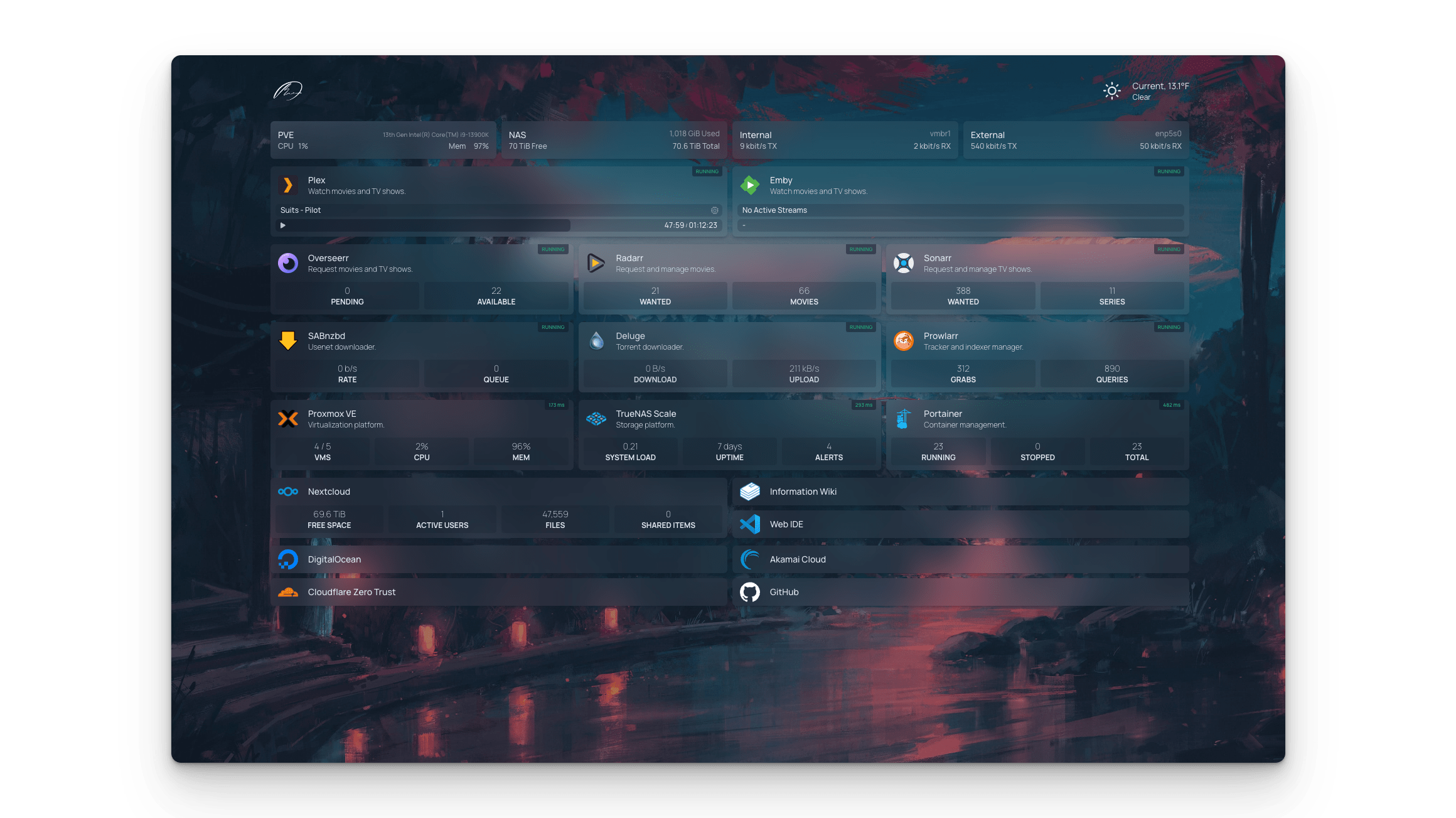
A highly customizable, modern homepage dashboard that integrates with Docker and 100+ service APIs, providing a unified entry point for accessing your services
Alternatives
Tech stack
No tech stack added yet. Sign in to suggest some
Homepage is a modern, highly customizable application dashboard that supports Docker and integration with more than 100 service APIs. It offers a fast, secure and good-looking way to organize and access all of your services and information.
Key Features
- Fast loading: a statically generated site that loads instantly
- Secure proxy: all API requests are proxied, keeping your API keys hidden
- Docker integration: container status monitoring and automatic, label-based service discovery
- Rich integrations: supports more than 100 service integrations, including all the popular self-hosted apps
- Multilingual support: full internationalization in more than 40 languages
- Service bookmarks: add custom links to the homepage
- Information widgets: weather, time, date, search and other handy utilities
Service Integrations
- Media services: media servers such as Plex, Jellyfin and Emby
- Download tools: Transmission, qBittorrent, Deluge and more
- *arr apps: automation tools such as Radarr, Sonarr, Lidarr and Bazarr
- Network tools: Ombi, Tautulli, Jackett, NZBGet, SABnzbd and more
- System monitoring: supports monitoring the status of a wide range of systems and services
- Custom API: supports custom API integrations
Technical Features
- Front-end framework: Next.js (React)
- Styling system: Tailwind CSS
- Configuration: YAML files
- Container support: native Docker support, multi-architecture images
- API proxy: built-in API proxy for security
- Static generation: static pages generated at build time
Deployment Requirements
- Runtime environment: Node.js 18+ or Docker
- Architecture support: AMD64, ARM64
- Storage requirements: only configuration files are stored, so requirements are small
- Network requirements: network connectivity to the APIs of the various services
- Optional dependency: Docker socket (for container integration)
Security Considerations
- Reverse proxy: it is recommended to deploy behind a reverse proxy with authentication
- API security: all API requests are handled through the proxy
- No authentication layer: it has no built-in authentication, so external authentication is required
- SSL support: deploying with HTTPS is recommended
Docker Deployment Examples
Basic Deployment
version: "3.3"
services:
  homepage:
    image: ghcr.io/gethomepage/homepage:latest
    container_name: homepage
    ports:
      - 3000:3000
    volumes:
      - /var/run/docker.sock:/var/run/docker.sock:ro # Docker integration (optional)
      - ./config:/app/config # local configuration directory
      - ./images:/app/public/images # local images directory
    restart: unless-stopped
Advanced Deployment Configuration
version: "3.3"
services:
  homepage:
    image: ghcr.io/gethomepage/homepage:latest
    container_name: homepage
    environment:
      PUID: 1000
      PGID: 1000
    ports:
      - 3000:3000
    volumes:
      - /var/run/docker.sock:/var/run/docker.sock:ro
      - ./config:/app/config
      - ./images:/app/public/images
    restart: unless-stopped
    labels:
      - "traefik.enable=true"
      - "traefik.http.routers.homepage.rule=Host(`homepage.example.com`)"
      - "traefik.http.routers.homepage.tls=true"
      - "traefik.http.routers.homepage.tls.certresolver=letsencrypt"
Configuration Examples
Service Configuration (services.yaml)
- Web Services:
    - Nextcloud:
        href: https://nextcloud.example.com
        description: Personal cloud storage
        icon: nextcloud.png
        widget:
          type: nextcloud
          url: https://nextcloud.example.com
          username: admin
          password: password

- Media Services:
    - Jellyfin:
        href: https://jellyfin.example.com
        description: Media server
        icon: jellyfin.png
        widget:
          type: jellyfin
          url: https://jellyfin.example.com
          key: your-api-key

    - Transmission:
        href: https://transmission.example.com
        description: BT downloader
        icon: transmission.png
        widget:
          type: transmission
          url: https://transmission.example.com
          username: admin
          password: password
Widget Configuration (widgets.yaml)
- logo:
    icon: https://raw.githubusercontent.com/gethomepage/homepage/main/docs/assets/light_squircle%402x.png

- search:
    provider: google
    target: _blank

- greeting:
    text_size: xl
    text: "Welcome back!"

- datetime:
    text_size: xl
    format:
      timeStyle: short
      dateStyle: short
      hourCycle: h23

- weather:
    label: Beijing
    latitude: 39.9042
    longitude: 116.4074
    provider: openweathermap
    apiKey: your-api-key

- resources:
    cpu: true
    memory: true
    disk: /
    expanded: true
    label: System Resources
Bookmark Configuration (bookmarks.yaml)
- Development Tools:
    - GitHub:
        - href: https://github.com
          icon: github.png
    - Docker Hub:
        - href: https://hub.docker.com
          icon: docker.png

- Social Media:
    - Twitter:
        - href: https://twitter.com
          icon: twitter.png
    - Reddit:
        - href: https://reddit.com
          icon: reddit.png
Advanced Features
Automatic Discovery with Docker Labels
# Container label example
services:
  jellyfin:
    image: jellyfin/jellyfin
    labels:
      - homepage.group=Media Services
      - homepage.name=Jellyfin
      - homepage.icon=jellyfin.png
      - homepage.href=http://localhost:8096
      - homepage.description=Media server
      - homepage.widget.type=jellyfin
      - homepage.widget.url=http://localhost:8096
      - homepage.widget.key=your-jellyfin-token
Custom Themes
/* custom.css */
:root {
  --color-50: 250 250 249;
  --color-100: 245 245 244;
  --color-200: 231 229 228;
  --color-300: 214 211 209;
  --color-400: 168 162 158;
  --color-500: 120 113 108;
  --color-600: 87 83 78;
  --color-700: 68 64 60;
  --color-800: 41 37 36;
  --color-900: 28 25 23;
}
Custom JavaScript
// custom.js
document.addEventListener('DOMContentLoaded', function() {
    // Custom functionality
    console.log('Homepage has finished loading');
});
Supported Service Integrations
Media Management
- Plex/Jellyfin/Emby: media server status and statistics
- Tautulli: Plex activity monitoring
- Ombi/Overseerr: media request management
Download Tools
- qBittorrent/Transmission/Deluge: BT download status
- SABnzbd/NZBGet: Usenet download monitoring
- Jackett/Prowlarr: torrent indexer status
The Arr Family
- Sonarr/Radarr/Lidarr: automated media management
- Bazarr: subtitle management
- Readarr: e-book management
System Monitoring
- Proxmox: virtualization platform monitoring
- Unraid: NAS system monitoring
- pfSense/OPNsense: firewall status
Cloud Storage
- Nextcloud/ownCloud: personal cloud storage
- Seafile: file synchronization service
Network Tools
- Pi-hole: DNS ad blocking
- AdGuard Home: network-wide ad blocking
- Wireguard: VPN service status
Container Management
- Portainer: Docker management interface
- Watchtower: automatic container updates
Customization Options
Theme Customization
- Built-in themes: a variety of preset themes to choose from
- Custom CSS: fully customizable styling
- Icon support: supports both local and online icons
- Layout control: a flexible grid layout system
Internationalization
- 40+ languages: complete multilingual support
- RTL support: supports right-to-left languages
- Date formats: localized date and time formats
- Number formats: localized number display formats
Responsive Design
- Mobile-friendly: excellent support for mobile devices
- Touch-friendly: interactions optimized for touch devices
- Multiple resolutions: adapts to all kinds of screen sizes
- PWA support: can be installed as a PWA app
Performance Optimization
Static Generation
- Build-time optimization: static page generation
- CDN-friendly: supports CDN deployment
- Caching strategy: sensible caching mechanisms
- Lazy loading: lazy loading of images and components
Resource Management
- Image optimization: automatic image optimization and compression
- Code splitting: code is loaded on demand
- API proxy: built-in API proxy reduces latency
- Local storage: local caching of configuration
Security Considerations
Access Control
- Reverse proxy authentication: it is recommended to use it together with an authenticating proxy
- API key protection: all API requests are handled through the proxy
- CORS configuration: sensible cross-origin access control
- CSP policy: protection through a Content Security Policy
Best Practices
- HTTPS deployment: enforce HTTPS
- Network isolation: sensible network access control
- Regular updates: keep the software up to date
- Configuration backups: back up configuration files regularly
Use Cases
Individual Users
- Home lab: manage all your self-hosted services in one place
- Media center: centralized access to media services
- Productivity tools: quick access to work-related services
Small Teams
- Development teams: a unified entry point for development tools
- Operations monitoring: centralized monitoring of the status of various services
- Documentation hub: brings together various documents and tools
Enterprise Applications
- Internal portal: a portal for internal company services
- Monitoring dashboard: a center for monitoring systems and services
- Quick navigation: navigation to commonly used tools and services
Homepage is an ideal choice for self-hosting enthusiasts. Not only does it provide a good-looking interface, it also offers powerful integration capabilities and a high degree of customizability. Whether you are an individual user or part of a small team, you can benefit from it and build a service hub of your own.
Discover more

Dashy
Feature-rich homepage for your homelab, with easy YAML configuration.

Dreeve
Dreeve is a self-hosted, open-source dashboard for your sports and fitness data

Expensave
Personal and family expense tracking and budgeting application, enabling better financial management
Fenrus
Personal home page that allows for multiple users, guest access and multiple dashboards for each user. It also has "Smart Apps" which display live data for those apps.

Glance
A self-hosted information dashboard that brings all your data sources together in one place

Heimdall
Elegant solution to organise all your web applications.