
Pulse
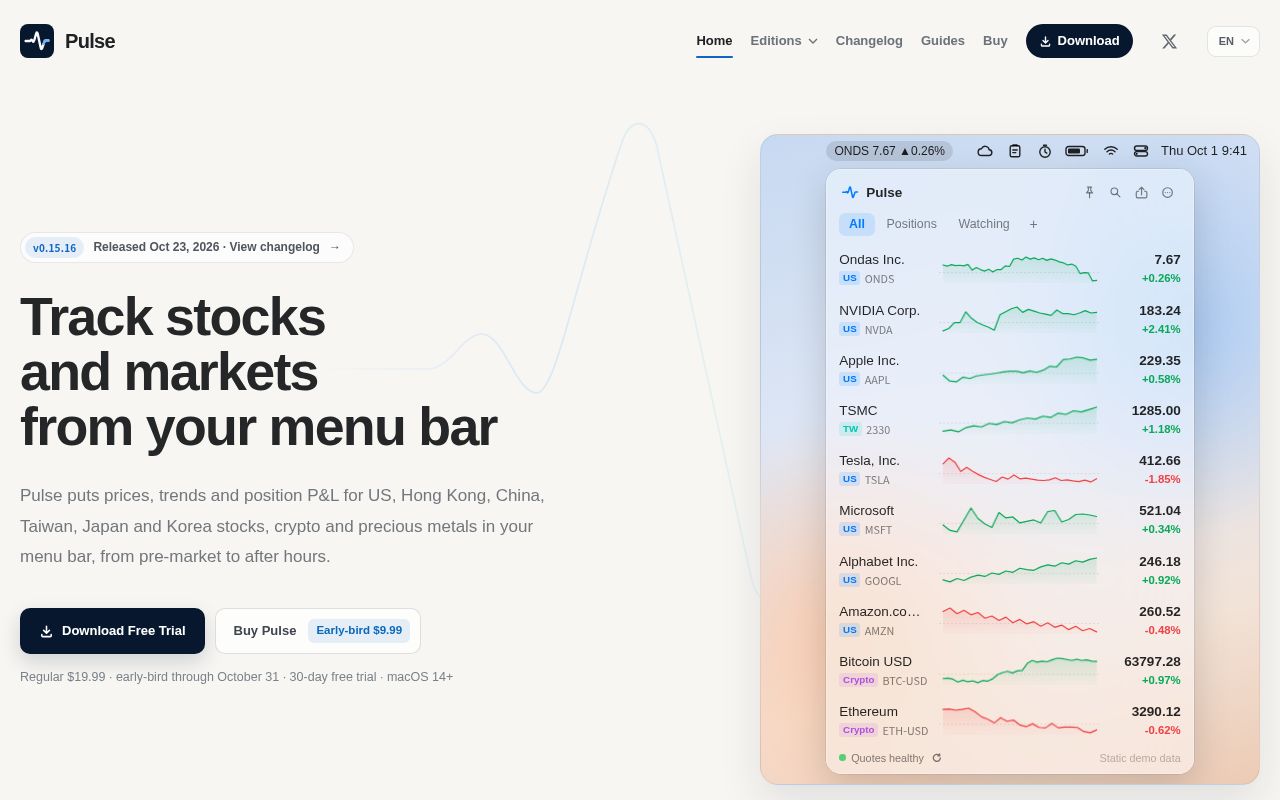
Pulse is a lightweight macOS menu bar app for checking prices, trends, and position P&L for US, Hong Kong, A-share, Taiwan, Japan, and Korea stocks, plus crypto and precious metals. Your watchlists and holdings are stored on your Mac, and no account is required.
Alternatives
Tech stack
No tech stack added yet. Sign in to suggest some
Pulse is a macOS app that shows market quotes in the menu bar. It puts prices, trends, and position P&L right in the menu bar, so you can keep an eye on the market while you work without switching windows. It is for viewing quotes only: it does not place orders or connect to any broker to execute trades.
Key features
- Multi-market coverage: Supports US stocks, Hong Kong stocks, A-shares (Shanghai and Shenzhen), Taiwan stocks (listed and OTC), Japan stocks, Korea stocks, crypto, precious metals (including Shanghai Gold Exchange prices), indexes, and ETFs. Search by ticker or name.
- Candlestick charts: Candlestick charts with volume, with scroll-wheel zoom and horizontal browsing. Intervals include 5 minutes, 15 minutes, 30 minutes, 1 hour, and daily, weekly, and monthly.
- Pre-market and after-hours: US stock intraday charts cover 04:00–20:00 Eastern Time, with pre-market and after-hours shown in gray. You can turn this on or off in Settings.
- Position P&L: Record quantity, cost, and trades. Pulse totals daily P&L and position P&L by market and generates your holdings list automatically.
- Multiple watchlists: Create multiple named lists, reorder them by dragging, and switch quickly with ⌘1–9. The quotes scrolling in the menu bar can come from any one of your lists.
- Local MCP server: Once enabled in Settings, Pulse runs a Streamable HTTP MCP server on your Mac. MCP-capable clients such as Claude and ChatGPT can read and edit your watchlists, holdings, and trade records. The server binds only to 127.0.0.1 and authenticates with a Bearer Token stored in the Keychain.
Data and privacy
- Watchlists, holdings, and trade records are stored only on your Mac. No account is needed for the trial or for purchase, and purchases made on the website deliver a license key by email.
- Quotes come from data sources including Longbridge, Binance, Tencent, the Taiwan Stock Exchange, Yahoo Finance, Naver, the Shanghai Gold Exchange, Eastmoney, and Sina Finance.
- With the free data sources, US, A-share, Taiwan, and Korea stocks refresh about every 15 seconds, and the refresh interval can be adjusted per data source. Hong Kong stocks are delayed by about 15 minutes, and Japan stocks by about 20 minutes. When the popover is open, crypto quotes are pushed from Binance once per second.
- You can connect your own Longbridge OpenAPI account to get pushed quotes for US, Hong Kong, and A-share stocks. The quote level depends on your account's market data permissions.
- Every quote is labeled as real-time or delayed.
- Anonymous usage statistics can be turned off in Settings.
How it differs from Apple's built-in Stocks app
According to the comparison on the website, Apple's built-in Stocks app is free and works well for reading news headlines. Pulse lives in the menu bar, lets you track holdings and P&L, offers candlestick charts from 5-minute to monthly, and supports a local MCP server.
Pricing and availability
- A 30-day free trial with all features is available. After the trial ends, quotes stop refreshing until you purchase, while your watchlists, holdings, and settings remain on your Mac.
- One-time purchase, no subscription, with future updates included. The website lists the price as $19.99, with an early-bird price of $9.99 until October 31.
- Purchases on the website are paid through Stripe. One license key can be used on up to 3 Macs, and updates are delivered in-app via Sparkle. The Mac App Store version is purchased with your Apple account at a region-dependent price, and the two purchase options are independent of each other.
- System requirements: macOS 14 Sonoma or later, on Apple silicon and Intel Macs.
Other versions
The website also lists two open-source projects:
- Pulse CC: Shows stock and crypto prices and percentage changes above the Claude Code prompt.
- Pulse for Omarchy: A version of Pulse for the Omarchy desktop environment. It can show prices in the status bar and also open watchlists and charts.
Notes
Market data is for reference only and does not constitute investment advice.
Discover more

Actual
Local-first personal finance tool based on zero-sum budgeting, supporting synchronization across devices, custom rules, manual transaction importing (from QIF, OFX, and QFX files), and optional automatic synchronization with many banks.

Akaunting
Accounting software designed for small businesses and freelancers.

Assets
A self-hosted FIRE tracker.

BTCPay Server
Bitcoin and other cryptocurrencies payment processor.

Bigcapital
Financial accounting and inventory management software for small to medium businesses.

Bitcart
Cryptocurrencies payment processor and development platform.